
In today's digital world, understanding the difference between HTTP and HTTPS is vital for anyone browsing the web or building an online presence. While both protocols facilitate data transfer, HTTPS adds a extra layer of security through encryption, protecting your data from prying eyes.
This article will uncover the technical aspects of both protocols, exploring how HTTP and HTTPS work and what their key differences are.
Understanding HTTP: How Websites Send and Receive Data
Standing for Hyper-Text Transfer Protocol, HTTP is the backbone of data communication on the world wide web. It defines how data is formatted and sent, as well as what actions web servers and browsers should take in response to various commands.
The HTTP Request-Response Cycle
The HTTP Request-Response cycle is a fundamental process that forms the foundation of all communication on the web. It's the sequence of events that enable browsers to get information from a web server and display it in an appropriate way. For example, you are reading this content.
This process begins with the client, your web browser, sending a HTTP request over to a web server. This is triggered by a user action, such as entering a URL into the address bar, clicking a hyper-link, or submitting a form.
This request is a formatted message that includes several parts:
- HTTP Method: This is an action that tells the server what the client wants to do. Common methods include:
- GET: Retrieves data from the server (e.g. getting a web page or image).
- POST: Sends data to the server (e.g. sending form data or uploading a file).
- PUT/ PATCH: Updates an existing resource on the server.
- DELETE: Removes a resource from the server.
- URL (Uniform Resource Locator): The address of the resource the client wants to interact with (e.g. /services/website-design/).
- Headers: Metadata about the request. This can include information about the client's browser, including the type of device and content it can accept (e.g. Mobile devices would want to be served a mobile version of a web page).
- Body (Optional): Contains any data being sent to the server, this is primarily used with methods like POST and PUT.
After receiving the request and processing it, the web-server sends back an HTTP response. This is the reply to the client's request. Much like the request, this response also has a specific structure:
- Status Code: A three digit number that indicates the outcome of the request:
- 2xx (Success): The request was successfully fulfilled (e.g. 200 OK).
- 3xx (Redirection): The client needs to take further action to complete the request (e.g. 301 Moved Permanently).
- 4xx (Client Error): There was an error with the client's request (e.g. 404 Not Found, 400 Bad Request).
- 5xx (Server Error): The server failed to fulfil a valid request (e.g. 500 Internal Server Error).
- Headers: Meta data about the response, such as the content type, date, and caching instructions.
- Body (Optional): The main content of the response, for example, a successful GET request for a web page, would return HTML, CSS, and JavaScript code.
Once the client receives the servers response and processes it, the browser can then render the data as a web page (or other form of readable data) for the user to see.
This entire process is repeated for every resource needed to load a complete page, including images, stylesheets, and scripts.
Understanding HTTPS: How it Protects Your Data
The key difference between HTTP and HTTPS is the added layer of security to this communication process. The added "S" to HTTPS stands for "Secure", meaning the connection between a client and server is encrypted.
This encryption happens through another internet protocol called SSL (Secure Sockets Layer) or it's more modern version TLS (Transport Layer Security).
You can think of it like this:
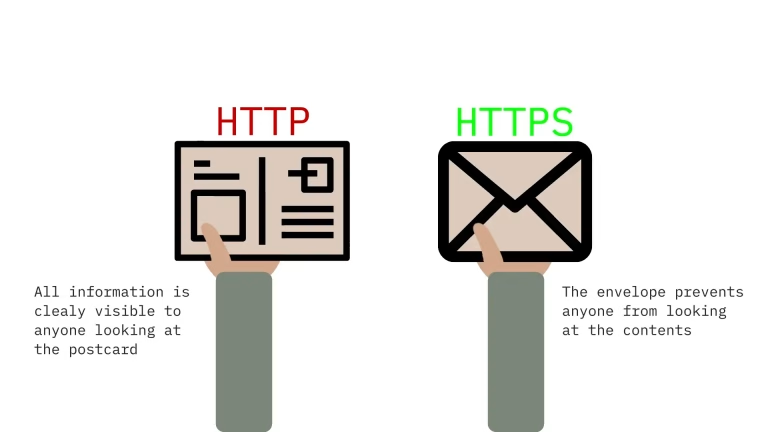
- HTTP is like sending a postcard. Anyone who intercepts it can read the message in plain text.
- HTTPS is like sending a letter in a sealed envelope. Even if someone intercepts it, they can't read the message inside.
How HTTPS Works: The SSL/TLS Handshake
Before any data is transferred, HTTPS performs a critical process known as the SSL/TLS handshake. This is a quick negotiation between the client and server that establishes a secure connection.
- Client Hello: Your browser sends a message to the website's server, asking to establish a secure connection.
- Server Hello: The server responds by sending back it's SSL/TLS certificate.
- Certificate Verification: Your browser checks the validity of the certificate, ensuring it can be trusted.
- Key Exchange: If the certificate is valid, the browser and server then create a unique private encryption key for that specific session.
- Encrypted Data Transfer (Request-Response Cycle): Only after all these steps are complete is the secure connection established, allowing encrypted data to flow through the Request-Response Cycle.
Why You Need HTTPS for Your Website
Implementing HTTPS is more that just good practice, it's essential for modern website security and user trust.
- Privacy and Security: HTTPS protects a users data from hackers, which is crucial for information such as login details, personal data, and banking details.
- Data Integrity: It ensures that all data sent between the client and server has not been tampered with.
- User Trust: The familiar padlock icon in the address bar gives users confidence that their information is safe.
- SEO Boost: Search engines like Google prioritise secure websites, so having HTTPS can actually improve your search ranking.
Does Your Website Need Securing?
Website security is crucial, and an unsecure website can be blocked by browsers, leading to less and less traffic coming to your site.
Why Do We Still Use HTTP?
With the clear advantages of HTTPS, it might be confusing why HTTP hasn't been fully removed.
While it's true that the vast majority of the web now uses secure connections, HTTP still has a few niche use cases.
- Legacy Systems: Some very old websites or applications were built before HTTPS was commonly used, the cost or effort needed to update them to use HTTPS may be deemed too high for their limited purpose.
- Performance on Older Devices: Although modern advancements have made HTTPS increasingly fast, the encryption process can cause problems on older, low-end systems. This means those devices likely would still use HTTP for non-sensitive data, helping to balance performance with security.
- Internal Networks: Private networks that aren't exposed to the public internet, such as a LAN (Local Area Network) or an intranet, the security offered by HTTPS may be considered unnecessary.
- Testing and Development: When developers are working on local projects, they often utilise HTTP as it is already in a secure environment and this simplifies the testing process by removing the need for SSL certificates.