Bots are everywhere online. They spam your contact forms, post fake comments, and even try to break into accounts. In today's online world, your websites security is more important than ever. That's where CAPTCHAs come in. A security detail for your website, verifying that only real humans are interacting with your content.
In this article, we’ll break down what CAPTCHA is, the different types available, and why your website should use them.
What is CAPTCHA?
CAPTCHA stands for “Completely Automated Public Turing test to tell Computers and Humans Apart.”
It’s a security system that challenges users with simple tests that humans can easily solve — but bots cannot. These tests help confirm that the person interacting with your site is real.
Why CAPTCHA Exists
The main purpose of CAPTCHA is to protect your website from automated abuse. Common threats include:
-
Spam Submissions: Fake inquiries or sign-ups that clog your inbox
-
Brute Force Attacks: Bots trying endless password combinations to break into accounts
-
Fake Accounts: Bots creating thousands of accounts to exploit systems
Without CAPTCHA, your website is an easy target.
Types of CAPTCHA
CAPTCHA has evolved to keep up with smarter bots. Here are the most common types:
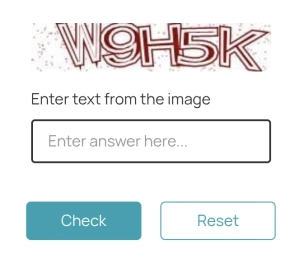
Text-based CAPTCHA
This is the original CAPTCHA, asking users to type out letters and numbers from a distored image.
Pros: Simple and quick
Cons: Easy for AI to bypass and difficuilt for people with impaired vision.
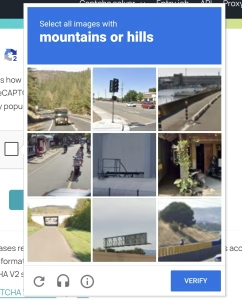
Image-based CAPTCHA
You've likely seen this type of CAPTCHA implemented on most websites requiring a user to login. Often these CAPTCHAs require users to identify an object i.e. a traffic light and click all objects until there are none left.
Pros: Much harder for bots
Cons: Slower and can be frustrating for users
Audio CAPTCHA
A much less common form of CAPTCHA designed for visually impaired users. This challenges users to transcribe a short audio clip.
Pros: Provides an accessible alternative
Cons: Not all users have access to play audio
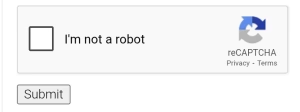
reCAPTCHA (Google's Solution)
Google revolutionized CAPTCHA with reCAPTCHA, which uses AI and user behavior analysis to minimize disruptions:
-
reCAPTCHA v2: The classic “I’m not a robot” checkbox
-
Invisible reCAPTCHA: Works in the background without user action
-
reCAPTCHA v3: Scores user behaviour for advanced bot detection
Why You Should Use CAPTCHA or reCAPTCHA
Every modern website needs protection against bots. Here’s why:
- Stop Spam: Block bots from flooding your forms
- Enhance Security: Reduce automated attacks and fraud
- Build Trust: Visitors feel safer on a secure website
How to Add reCAPTCHA to Your Website
Adding CAPTCHA can be as simple as installing a plugin or writing a few lines of code. For reCAPTCHA:
-
Get your API key from Google reCAPTCHA
-
Add it to your form’s backend
-
Test to make sure it works
Not sure how to do it? Easykode Website Solutions can handle this for you as part of our Managed Hosting services.
Final Thoughts
CAPTCHA is your website’s first line of defence against bots — and reCAPTCHA makes that defence smarter than ever. If you value your site’s security, this is non-negotiable.
Ready to protect your website?
Contact Easykode Website Solutions today to secure your site with reCAPTCHA and so much more.
Get in Touch